Asus X507UF in 2026: Still Worth the NVMe + RAM Upgrade?
Real-world results from taking this older laptop to 32GB RAM and a 1TB NVMe SSD.
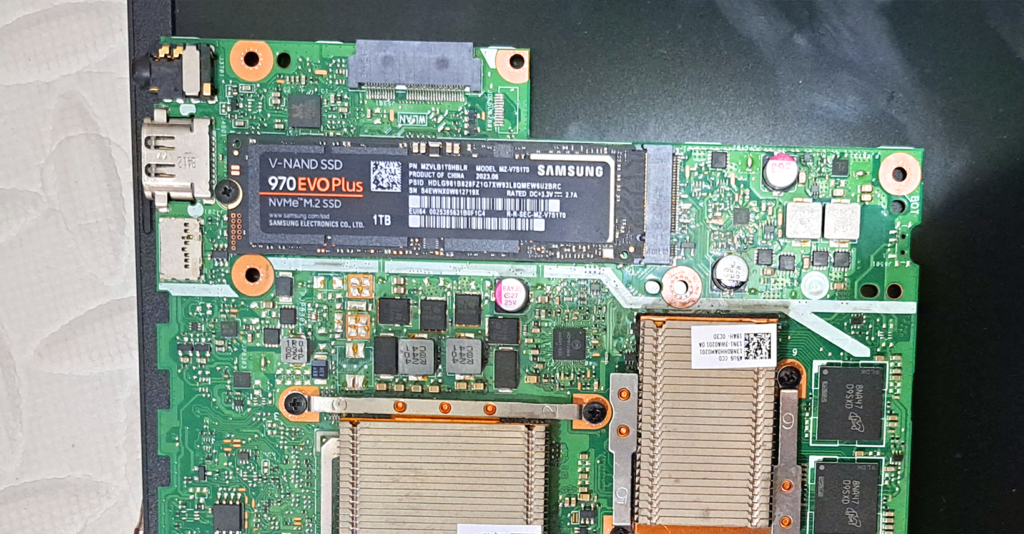
The Asus X507UF is an older 15.6" laptop (8th-gen Intel era), but it has a secret: a hidden M.2 NVMe slot and two RAM slots. With used prices dirt cheap in 2026, the question is whether a full upgrade makes it a genuinely usable daily driver. I did the upgrade — here's the honest result.
Before the upgrade
- RAM: 8GB (4GB Samsung DDR4-2400 + 4GB Transcend DDR4-2666)
- Storage: 1TB Seagate spinning HDD — the main bottleneck
- Experience: sluggish boot, constant disk thrashing, painful multitasking
What I installed
- RAM: 2× 16GB DDR4-3200 (32GB total) — the board accepts it fine despite the official spec sheet
- SSD: 1TB NVMe SSD (Samsung 970 EVO Plus class) in the M.2 slot
After the upgrade
- RAM: 32GB DDR4-3200 dual-channel
- Storage: 1TB HDD (kept for bulk files) + 1TB NVMe (OS and apps)
- Experience: boots in seconds, dozens of browser tabs without swapping, and the NVMe makes the whole system feel generations newer
Is it worth it in 2026?
For office work, browsing, and light development: yes. A used X507UF plus a 1TB NVMe and 32GB of DDR4 is still far cheaper than any new laptop with those specs, and the day-to-day feel is night-and-day versus the stock HDD. For gaming or heavy creative work: no — the old GeForce MX130-class GPU and 8th-gen CPU are the hard ceiling, and no SSD fixes that.
Also note: in 2026, consider a PCIe 3.0 NVMe rather than overpaying for Gen4/Gen5 — this slot can't use the extra speed anyway.
Frequently asked questions
Does it really support NVMe, not just SATA M.2?
What's the max RAM?
Can I keep the old HDD too?
Conclusion
The X507UF is the poster child for "don't trash it, upgrade it." One NVMe SSD does 80% of the work; the RAM max-out finishes the job. Just respect the teardown — patience and a magnetic screw tray are mandatory.
Disclaimer: this reflects one real upgrade. Your mileage may vary — open your machine only if you're comfortable with the risk.